
Download Winter Comics – AI‑Powered Comic Creator, Free & Secure
Overview
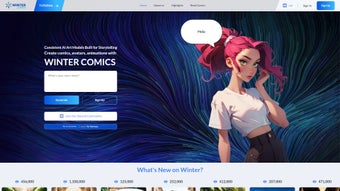
Winter Comics is an innovative web‑based application that puts the power of artificial intelligence into the hands of comic creators, writers, and visual storytellers. Designed with a clean, browser‑first interface, the platform lets anyone generate unique comic panels, characters, and dialogues in a matter of minutes. Whether you are a seasoned illustrator looking for rapid prototyping or a beginner eager to experiment with storytelling, Winter Comics removes technical barriers and streamlines the creative workflow.
The service is completely free, which means you can explore its AI‑driven features without any financial commitment. By focusing on AI text generation, character design, and panel composition, Winter Comics stands out in the crowded AI‑art space, offering a balanced blend of creativity and technology. Users can expect a seamless, secure experience from the moment they open the site to the final export of their comic strips, making it an essential tool for anyone interested in diving into the world of digital comics.
Features & Benefits
- AI‑Generated Panels – Instantly create fully rendered comic panels based on simple textual prompts.
- Character Designer – Generate original characters with adjustable traits such as style, pose, and expression.
- Dynamic Dialogue Engine – Produce natural‑sounding speech bubbles that match the tone of your story.
- Template Library – Access a growing collection of pre‑made layouts for genres ranging from superhero to manga.
- One‑Click Export – Download your comics as PNG, JPEG, or PDF for easy sharing on social media or print.
- Collaboration Mode – Invite teammates to edit and comment on projects in real time.
- Cross‑Platform Access – Works in any modern browser on Windows, macOS, Linux, Android, and iOS.
- Free Usage – No hidden fees, subscription, or credit‑card requirement to start creating.
Why Winter Comics Stands Out
The combination of AI‑driven generation and a user‑friendly interface creates a unique value proposition. Traditional comic‑making tools often require a steep learning curve, multiple software licenses, and manual drawing skills. Winter Comics bypasses these hurdles by allowing you to describe what you want, and the AI takes care of the visual rendering.
This accelerates the ideation phase, enabling creators to iterate faster and focus on narrative development rather than technical execution. Moreover, the free‑to‑use model encourages experimentation, making it a low‑risk entry point for hobbyists and educators alike. The platform also respects user privacy; all data is processed securely on encrypted servers, and projects can be saved locally without mandatory cloud storage.
Pros & Cons
- Pros
- Fast, AI‑powered comic generation reduces production time.
- Intuitive drag‑and‑drop interface suitable for beginners.
- Completely free with no subscription walls.
- Cross‑device compatibility – works on any browser.
- Secure processing and optional local storage.
- Cons
- Advanced artistic control is limited compared to professional illustration software.
- Reliance on internet connectivity; offline use is not supported.
- AI output may sometimes require manual tweaking for highly specific visual styles.
Installation, Usage & Compatibility
Winter Comics is a web application, which means there is no traditional installation process. To get started, simply open your preferred web browser and navigate to the official Winter Comics website. The platform is built on modern web standards, ensuring smooth performance on the latest versions of Chrome, Firefox, Safari, and Edge. Because it runs entirely in the browser, there is no need to download executables, manage updates, or allocate disk space.
Step‑by‑Step Guide
- Access the Site – Visit wintercomics.example.com and click “Start Creating”.
- Create an Account (Optional) – Register with an email address to save projects in the cloud, or continue as a guest for immediate use.
- Choose a Template – Select a layout from the library or start with a blank canvas.
- Enter Your Prompt – Describe the scene, characters, and dialogue you envision. The AI will generate a panel within seconds.
- Fine‑Tune Elements – Adjust character poses, speech bubble placement, and background colors using the intuitive toolbar.
- Preview & Export – Review the finished comic, then click “Export” to download in your preferred format.
Operating System Compatibility
Winter Comics is compatible with Windows 10/11, macOS 10.15 or later, Linux distributions with modern browsers, Android 8.0+, and iOS 13+. Because the tool runs in the cloud, performance is primarily dependent on internet speed and browser capabilities rather than the underlying operating system.
Security & Updates
The service employs HTTPS encryption for all data transfers, ensuring that your creative ideas remain private. Updates to the AI engine and user interface are rolled out automatically on the server side, so you always benefit from the latest improvements without manual intervention. If you choose to save projects locally, the downloaded files are stored on your device and are not transmitted unless you opt to use the cloud sync feature.
Frequently Asked Questions
Is Winter Comics really free to use?
Yes, Winter Comics offers a completely free tier with full access to its core features, including AI panel generation, character design, and one‑click export. There are no hidden subscription fees, and you can start creating without providing payment information.
Do I need any artistic skills to create comics?
No artistic background is required. Winter Comics’ AI engine interprets simple text prompts and automatically renders high‑quality visuals. You can refine the output using intuitive controls, but the platform is designed to be accessible for beginners.
Can I collaborate with others on a single comic project?
Yes, the Collaboration Mode lets you invite teammates via a shareable link. Participants can edit panels, add dialogue, and leave comments in real time, making it ideal for group storytelling or classroom projects.
What browsers are supported?
Winter Comics works on the latest versions of Chrome, Firefox, Safari, and Edge. For the best experience, ensure your browser is up to date and that JavaScript is enabled.
Is my data safe when I use the cloud saving feature?
All data transmitted to Winter Comics servers is encrypted using HTTPS. Projects saved in the cloud are stored on secure servers, and you retain full ownership of your content. You can also choose to keep all files locally for maximum privacy.
Conclusion & Call to Action
Winter Comics delivers a compelling mix of AI technology, ease of use, and zero cost, making it a standout choice for anyone looking to dive into comic creation. Its ability to generate complete panels from brief descriptions removes many of the traditional barriers that have kept aspiring storytellers from producing visual narratives. While the platform may not replace high‑end illustration software for detailed artistic control, it excels as a rapid prototyping and ideation tool, especially for writers, educators, and hobbyists. The cross‑platform, browser‑based nature ensures you can work wherever you are, and the secure, free model encourages endless experimentation.
Ready to bring your stories to life? Download Winter Comics now and start crafting your first AI‑generated comic today. Experience the future of comic creation—fast, fun, and free.
Pros: Instant panel generation, free access, intuitive UI.
Cons: Limited fine‑grained artistic control, requires internet.



.png)



